
App Marketing Tools
Tools don’t replace strategy - they reduce friction. This page is a practitioner-led map of the tooling you need to run a sustainable app growth system. Use it to build a lean, repeatable stack.
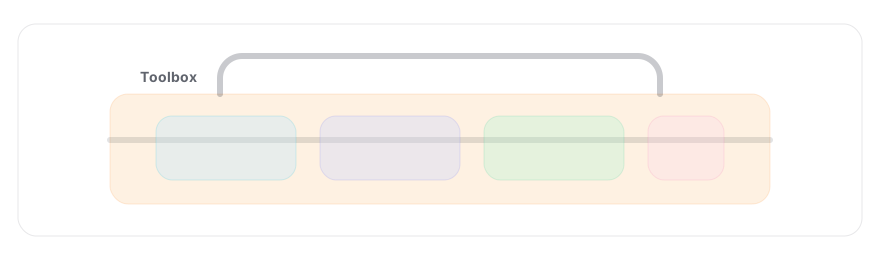
Tool stack
1) Store intelligence (ASO)
The job of ASO tooling is to shorten the path from question → evidence → action.
Example app: SHEIN (US iPhone App Store). The point isn’t “look at SHEIN”, it’s what your tooling lets you prove quickly: where demand is, what you actually win, what creatives are in market, and how you’re trending vs rivals.
| Keyword | SHEIN rank | Est. daily impressions | Why it matters |
|---|---|---|---|
| shein | #1 | ~39,278 | Brand demand, useful for incrementality checks vs Apple Search Ads. |
| shopping | #1 | ~32,661 | High‑volume generic, proves you can win non‑brand shelf space. |
| shein curve | #1 | ~1,814 | A “narrow intent” term, ideal for Custom Product Page message‑match. |
These are examples; the workflow is the point: pick 3–10 intent clusters, track rank + demand, and tie to creative/CPP decisions.
This plots the top 10 apps that have appeared in the top 10 positions for shopping at any point in the last 30 days. The goal is to see stability (entrenched incumbents) vs volatility (windows where you can break in).
How to use this: if a rival is bouncing between #8–#10, it’s a realistic target; if the top 3 are flat for 30 days, plan on winning with CPPs + paid to manufacture learning, not “one metadata tweak”.
Apple Search Ads now shapes the store experience, not just your paid CPA. So a store intelligence platform needs paid insight that’s usable for bidding, creative, and organic strategy.
- Bid strength ≠ win/lose: “Auction Position” tells you where you usually sit in the stack (e.g. #1 means you typically win the ad spot; #2–#5 means you’re entering but getting fewer impressions).
- Spot the new placement opportunity: keywords sitting at #2 are often your best candidates for the new App Store ad slot. You’re close enough to scale without buying your way from irrelevance.
- Quantify cannibalisation: if you’re buying heavy volume on terms where you already rank high organically, you can reduce waste by adjusting bids based on auction position + organic rank (not just a binary “did we show an ad?”).
- See the full competitive set: the “Auction Top 5” view shows who entered the auction, not just who won. That’s the missing context in most ASO platforms.
- CPP intelligence per keyword: you can see which advertisers are running Custom Product Pages on specific keywords and open them in the interface to mine message‑match ideas (what they changed vs their default page).
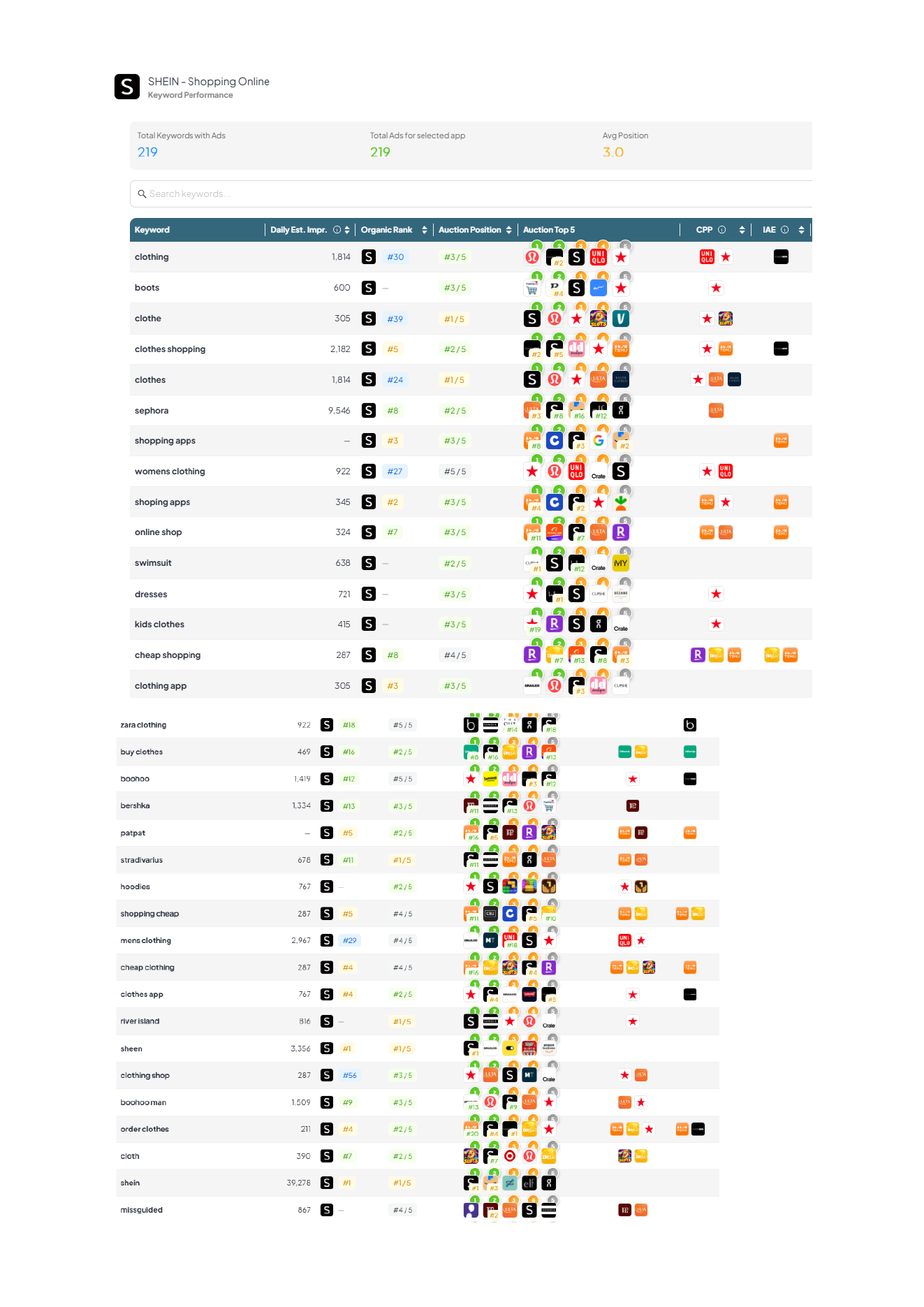
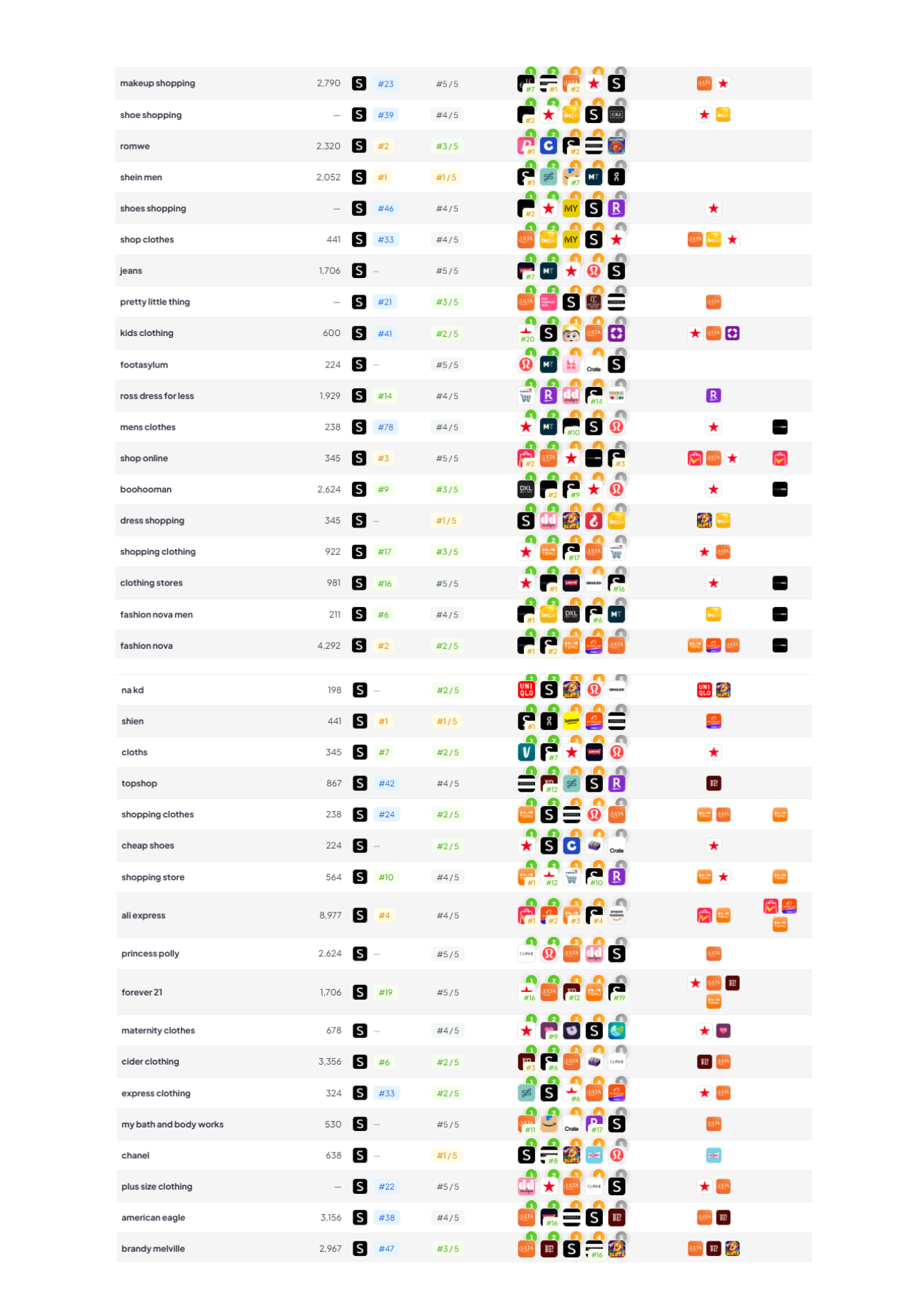
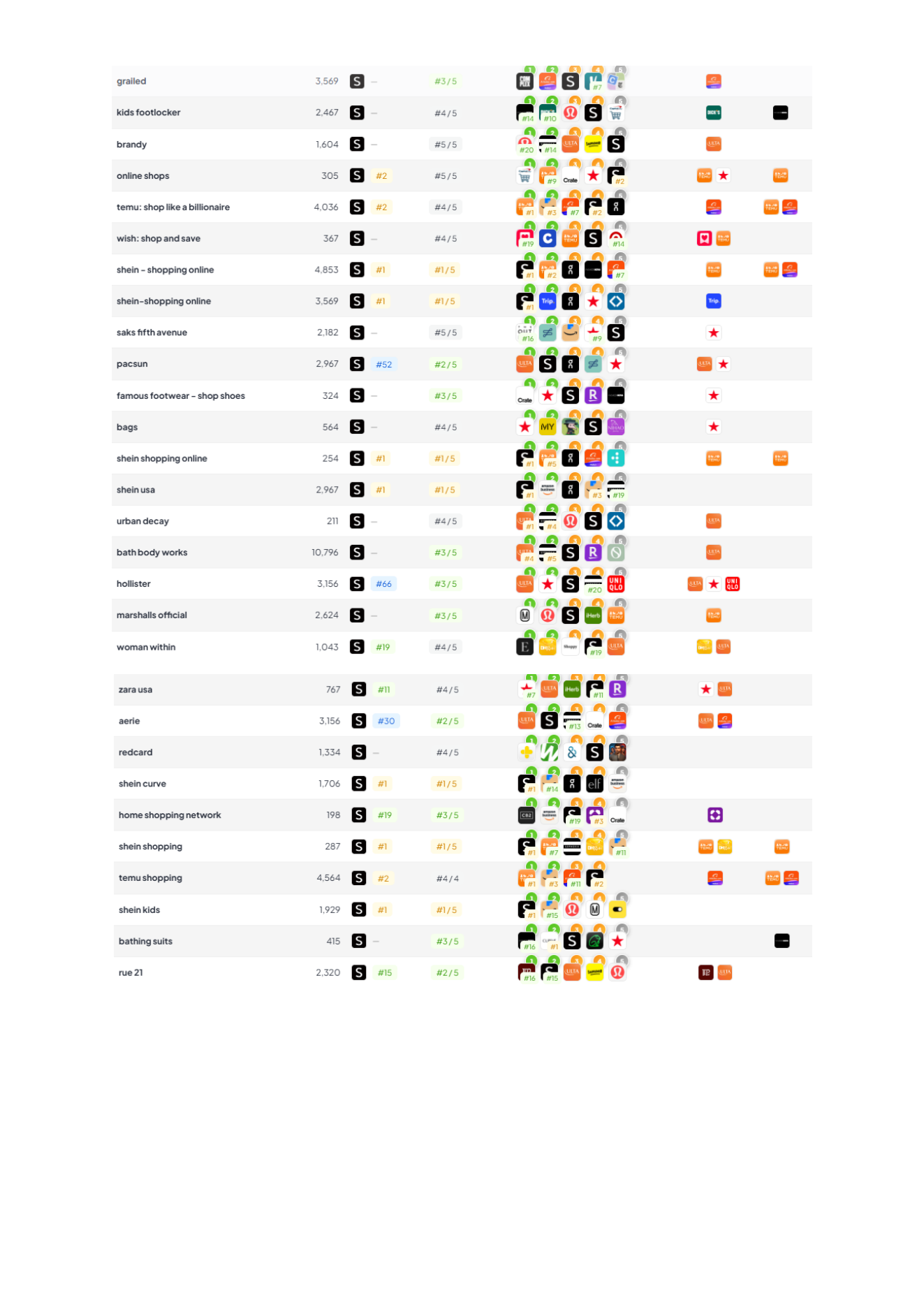
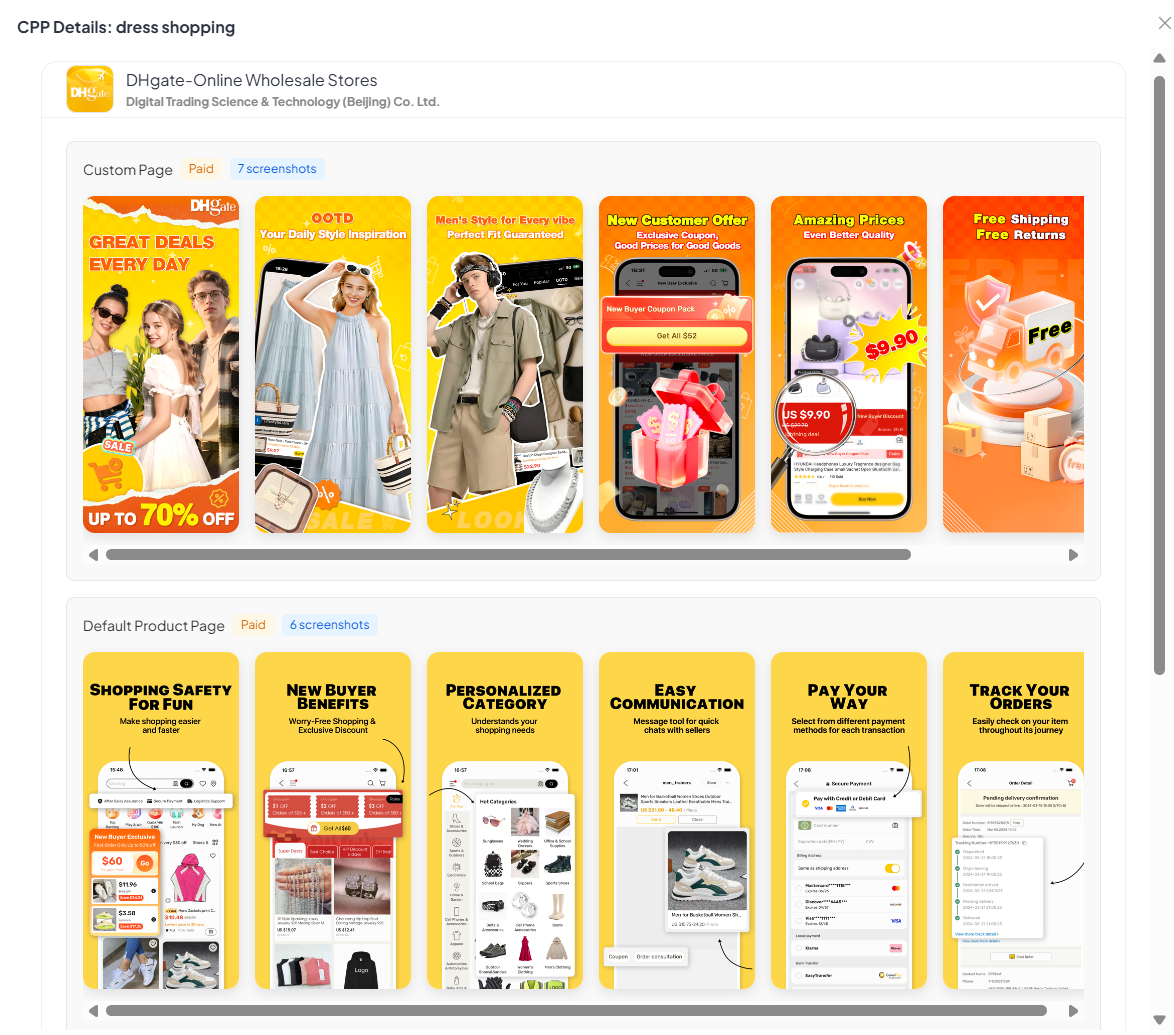
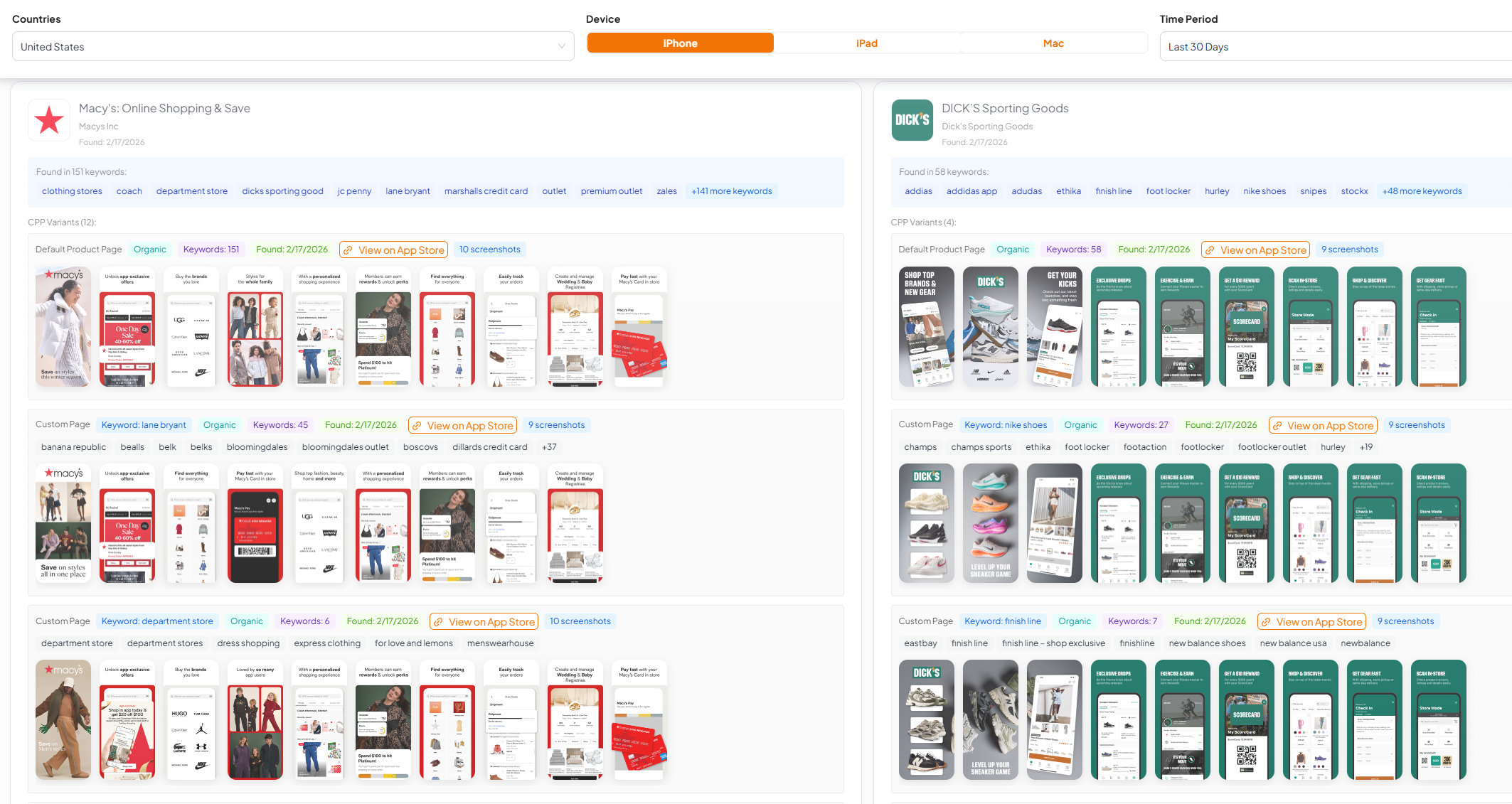
A solid store intelligence platform shouldn’t just show your default page. It should show the variants competitors are running and the keywords/events they’re attached to.
- CPP discovery: find which apps are using organic CPPs, what the variant looks like, and the keyword clusters that trigger it.
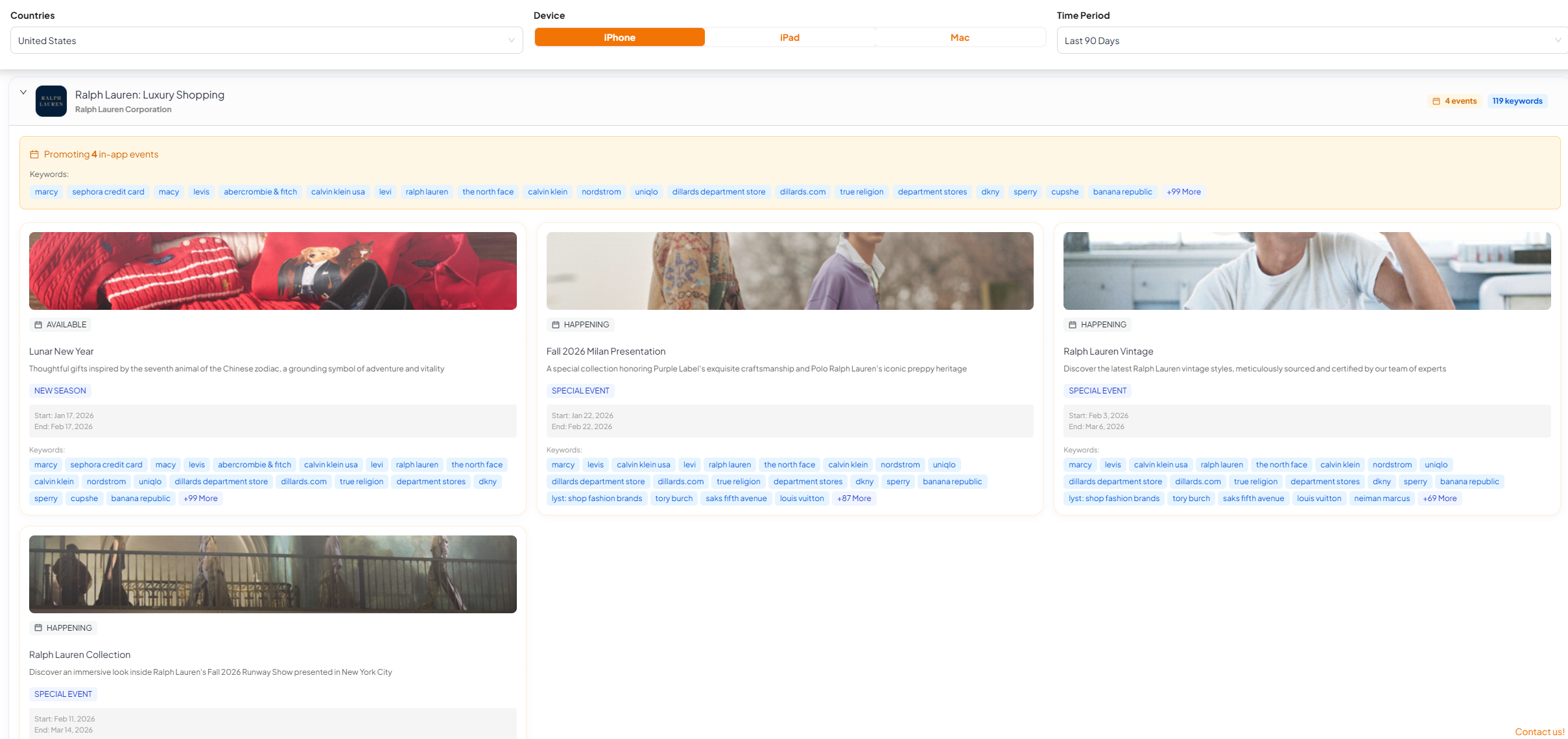
- IAE discovery: see which in‑app events are live, start/end dates, the copy, and the creative being used (a fast way to plan seasonality and “storefront merchandising”).
- Creative learning loop: open any variant/event in the interface to compare vs the default page and steal the pattern (message, proof, sequencing), not the pixels.
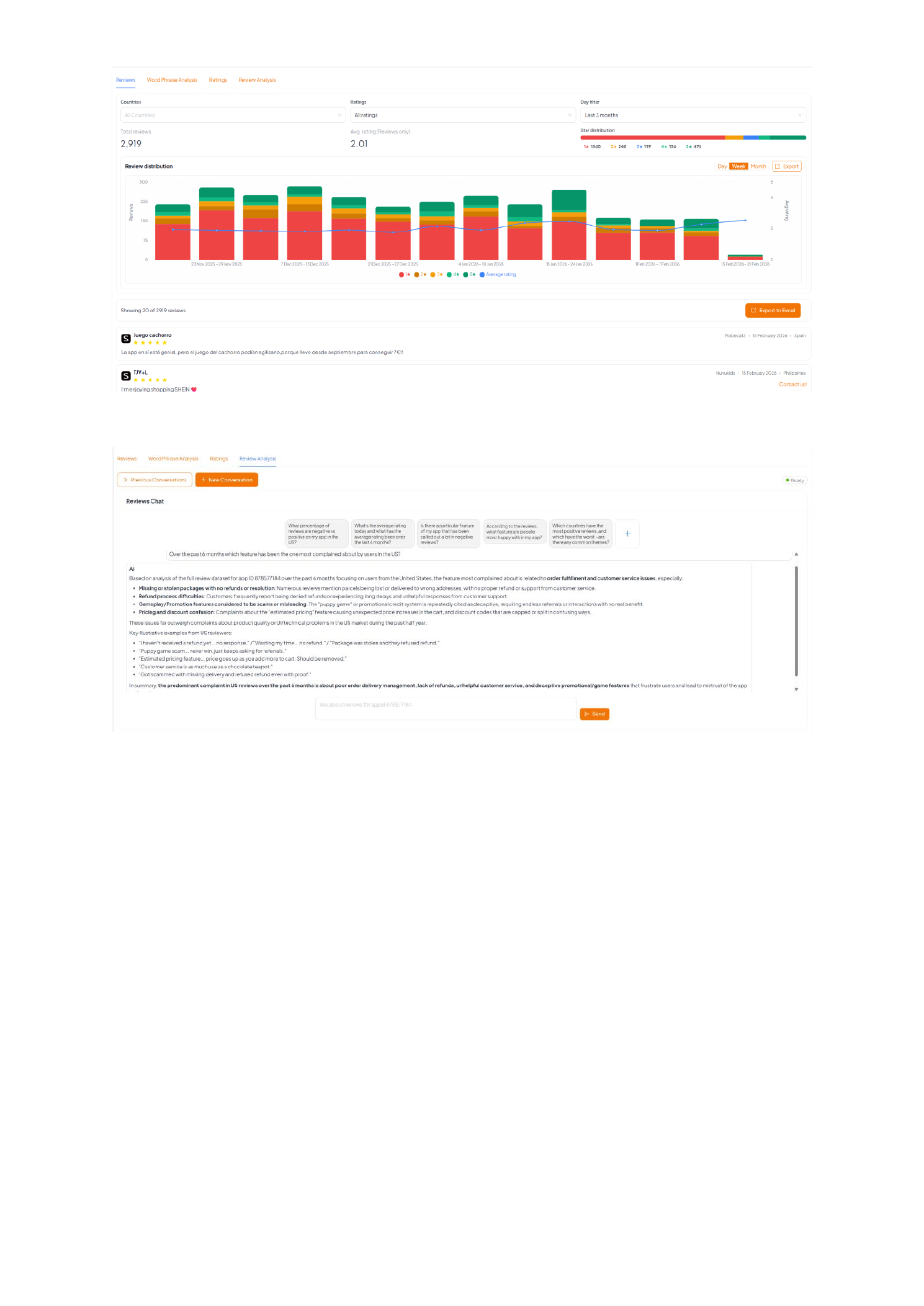
Ratings and reviews don’t just influence conversion. They’re a high‑signal source of product feedback. A good store intelligence platform should help you monitor rating shifts, spot theme spikes after releases, and turn review text into creative and roadmap inputs.
- Ratings trend + distribution: see whether you’re accumulating 1–2★ pain (or 4–5★ praise) over time, not just an average.
- Operational triage: filter by country, rating, and timeframe to catch “something broke in the latest build” quickly.
- Message mining: find the features users love (to call out in screenshots/metadata) and the friction they hate (to fix or de‑risk in store copy).
- AI query layer (ultimate outcome): ask plain‑English questions across reviews and get cited themes + example quotes.





Why this matters: you don’t just want “our downloads”. You want context: who’s surging, who’s flat, and whether your conversion / CPP / keyword moves correlate with momentum shifts.
Data shown is an example snapshot for editorial purposes, pulled from APPlyzer’s market data. Replace with your own app + competitors in your weekly workflow.
2) Creative & experimentation
Creative is usually the biggest conversion lever, which means the best tools make it easy to go from hypothesis to variant to measured impact without chaos.
- Versioning + QA: keep a clean history of screenshot sets (copy + frames + claims), with a simple QA checklist.
- Experiment support: PPO (iOS) + store listing experiments/custom listings (Android) with guardrails (traffic split, duration, success metric).
- Intent mapping: CPP planning that ties keywords/ads → a promise → a matching first screenshot (message‑match).
- Competitor scan: quick “what changed in their creatives this week?” so you don’t get surprised by a new angle.
Commonly used tools: Figma (design), Adobe CC (production), Canva (rapid variants), plus store‑experiment specialists like SplitMetrics / StoreMaven depending on team maturity. Reference: CMA - screenshots that convert.
- Monday: pull evidence (keywords, reviews, competitor creatives) → pick 1 intent cluster.
- Tuesday: write a creative brief (promise, proof, objections, screenshot order) → produce 1–2 variants.
- Wednesday: QA + publish (or launch experiment) → log what changed.
- Friday: review conversion + downstream signal → decide whether to keep, iterate, or revert.
- Build a simple screenshot library (claims, proof points, UI shots, badges) and a reusable frame template.
- Keep one Creative Change Log (date, what changed, why, expected impact).
- Run one habit: improve screenshot #1 for one intent cluster per week.
3) Paid acquisition
Paid is where you buy learning and distribution. The tooling goal isn’t “more dashboards”. It’s faster decisions on: what to bid on, what to show, and how to measure incrementality.
- Apple Ads: intent capture, brand defense, keyword expansion, CPP message‑match, and placement diagnosis (search/results/today tab depending on era).
- Google App Campaigns: scale + automation. Tooling should make asset learning and geo/segment controls understandable.
- Paid social (Meta/TikTok/Snap): demand creation + creative iteration that feeds store conversion (don’t separate them).
- Creative pipeline: fast ad‑to‑store consistency (same promise, same proof) so you don’t “win the click, lose the install”.
Paid channels create traffic, but the store page converts it. If your stack can’t answer “which promise converts for which intent?”, you’ll optimize spend instead of outcomes.
- Apple Ads: keyword discovery, match types, placement reporting, search terms, CPP mapping.
- Google App campaigns: asset reporting + creative learnings, geo structure, deep link configuration.
- Creative pipeline: a place to store “winning angles” (Notion/Sheets) + the exact store/CPP they should match.
- MMP integration: send post‑install events back to networks (where possible) so you optimise on value, not installs.
- Plan: pick 1–2 intent clusters → write the store promise → map to ASA/ad creative.
- Launch: run paid to manufacture learning (creative A/B + CPP variants) even if organic is flat.
- Read‑out: track not just CPA, but store CVR, keyword movement, and post‑install quality.
- Decide: keep the winner and roll into metadata/screenshots, or kill fast and document why.
- Protect basics: conversion tracking, deep links, and a clean campaign naming convention.
- Run one controlled test: one keyword cluster → one CPP variant → one success metric.
- Keep a “learning log” so paid experimentation improves organic (not just spend efficiency).
4) Engagement / CRM
Engagement tools are how you protect LTV. The store gets you the first install; CRM keeps the relationship alive. Your stack should make it hard to spam and easy to be relevant.
- Segmentation: behavioural cohorts (new vs activated vs lapsing vs high‑value) and event‑based triggers.
- Orchestration: lifecycle journeys (onboarding, habit, upsell, winback) across push, in‑app, email, SMS, and paid retargeting.
- Deliverability + governance: frequency caps, quiet hours, holdouts, and “don’t message users who just churned” rules.
- Experimentation: A/B tests on messages and journeys (not just copy), with holdouts so you can quantify incremental lift.
Big vendors you’ll see in the wild: Braze, Iterable, Salesforce Marketing Cloud, Airship, OneSignal, MoEngage.
- Messaging channels: push + in‑app first; add email/SMS when you can do it responsibly.
- Journey builder: onboarding, paywall education, content discovery, and winback, with clear entry/exit rules.
- Analytics baked-in: message/journey performance by cohort (not just open rate), plus holdouts to measure incremental impact.
- Governance: frequency caps, quiet hours, audience exclusions, and “global kill switch” for mistakes.
- Use reviews/support tickets to define the top 3 “onboarding failures” → build 1 journey to fix each.
- Run a weekly CRM review: top messages, opt-outs, complaints, and what you’ll change next week.
- Connect CRM experiments to store promises (e.g., if “fast delivery” is your top screenshot, your onboarding should reinforce it).
- Start with 3 core events: install, activation, purchase/goal (or the closest proxy).
- Build one high‑impact journey: install → activation (and measure retention lift).
- Only add complexity (segments, channels) when you can explain the “why” in one sentence.
5) Measurement, attribution & BI
Measurement is where good teams get unfair advantage, not because they have “more data”, but because they trust it. A practical stack usually has three layers:
- Attribution: installs + post‑install events for channel optimisation (with privacy‑aware caveats).
- Product analytics: what users actually do (funnels, retention, feature adoption, cohort LTV).
- BI: one place where store changes + marketing inputs + downstream value live together.
- Incrementality first: geo splits, holdouts, and controlled windows (especially for brand/retargeting).
- Sanity checks: compare sources (store console vs MMP vs backend), and track “unknown/organic” movement after big changes.
- Decision dashboards: the dashboard ends with a question like “what would we do differently next week?”
Common vendors: attribution/MMPs like AppsFlyer, Adjust, Branch, Singular, Kochava. Product analytics like Amplitude, Mixpanel, Firebase (GA4), Heap. BI like Looker, Power BI, Tableau, Mode, Metabase.
- MMP: attribution, SKAN handling, post‑install event mapping, fraud controls (if needed).
- Product analytics: funnels, retention, cohort analysis, feature adoption (what makes users stick?).
- Data layer: a warehouse (BigQuery/Snowflake) once you outgrow “dashboard sprawl”.
- BI: the executive view (north star + a few drivers) and the operator view (what to fix next).
- Weekly: one measurement read‑out: acquisition (by channel), store CVR, activation, retention, revenue (or proxy), plus anomalies.
- After every store change: tag the date → watch conversion + cohort quality for 7–14 days.
- Before scaling spend: run an incrementality check (holdout/geo) so you don’t scale cannibalisation.
- Make tracking boring: consistent event names, clean UTMs, and one “source of truth” dashboard.
- Pick 3 metrics you’ll never ignore: store CVR, activation rate, week‑1 retention (or revenue proxy).
- Document “known blind spots” (SKAN noise, attribution gaps) so you don’t over‑interpret precision that isn’t real.
6) Tool selection (how to avoid a bloated stack)
The fastest way to build a bloated stack is buying tools by category (“we need a CRM, we need analytics…”). Instead, buy your way out of specific delays.
- Start from questions: visibility gaps, conversion gaps, retention gaps, or measurement uncertainty.
- Pick one source of truth for store intelligence to avoid conflicting numbers.
- Minimise handoffs: the best stack lets one person go from insight → asset → experiment → read‑out.
- Protect workflow time: tools should shorten decision time, not add weekly reporting burden.
- 1× store intelligence tool (keywords + competitors + reviews)
- 1× experimentation process (PPO/experiments + a tracking doc)
- 1× attribution + product analytics baseline (MMP + product funnels/retention)
- 1× lightweight reporting cadence (weekly read‑out)
- Stage 1 (weeks 1–4): one store intelligence tool + a spreadsheet change log + basic analytics.
- Stage 2 (months 2–3): add an MMP and a basic CRM journey (install → activation), plus a repeatable creative workflow.
- Stage 3: add experimentation tooling (PPO/experiments), deeper segmentation, and a BI layer to connect store changes to value.
- Stage 4: automation for monitoring + evidence packs (alerts, change detection, review spikes), with audit trails.
7) A low-overhead workflow (what to do weekly)
- Pick one question: “Where are we leaking: visibility, conversion, or retention?”
- Pull evidence: keywords/ranks, review themes, ASA/CPP signals, competitor creative patterns.
- Ship one change: screenshot #1, a CPP variant, a metadata cluster, or a lifecycle message test.
- Measure honestly: conversion, downstream value, and what changed in the market at the same time.
- Write a read‑out: 10 lines with the evidence, the decision, and the result.
If your tooling doesn’t make those steps faster, it’s not helping. It’s adding overhead.
- One weekly meeting, one doc: decisions + why + what shipped.
- One change at a time (or clearly labelled bundles) so you can attribute impact.
- One evidence block per change: rank/keyword, review theme, creative comparison, or experiment result.
8) Operational tooling (the unglamorous bits)
Operational tooling is what keeps the machine running when people are busy. It’s rarely the “sexiest” category, but it’s what stops rework.
- Change logs: what changed in metadata/creative and when (and ideally why).
- Asset management: screenshots, copy variants, CPP mapping, and approval trail.
- Templates: briefs, experiment plans, QA checklists, and weekly read‑outs (so quality is consistent).
- Collaboration: lightweight workflows (Notion/Confluence/Linear/Jira) so decisions don’t live only in someone’s head.
- Docs + planning: Notion / Confluence / Google Docs.
- Work tracking: Linear / Jira / Trello (keep it light).
- Asset storage: Drive/Dropbox or a DAM if you’re large; the key is search + versioning.
- Release notes + support loop: link app releases to review themes and support volume.
- Create 3 templates: creative brief, experiment plan, weekly read‑out.
- Keep a single “where to find things” page: links to store console, MMP, analytics, CRM, creative files.
- Make “decision traceability” a habit: every change gets a one‑sentence why.
9) Automation & AI (where it helps - and where it doesn’t)
Use automation to compress manual work (monitoring, summarising, flagging changes). Avoid automation that replaces judgment (positioning, promises, and creative strategy). The best pattern is: AI drafts, humans decide.
- Good automation: keyword/rank alerts, review‑theme spikes post‑release, competitor creative change detection, weekly evidence packs.
- Risky automation: auto‑publishing content or auto‑changing bids without audit trails.
- Non‑negotiable: citations and click‑through back to raw evidence (screenshots, exports, source links).
If you can’t audit how a conclusion was reached, don’t automate it in production.
- Monitoring: alerts for rank drops, rating dips, review spikes, competitor creative changes.
- Summaries: weekly evidence packs that pull the same “top signals” without you hunting.
- AI analysis: review querying, creative pattern extraction, draft briefs, always with citations back to the raw.
- Automate only the boring parts: alerts + weekly summaries.
- Keep the “decision” manual: what to change, what to claim, what to test.
- When in doubt, choose repeatability over cleverness.
10) What “practitioner-backed” looks like (in tooling terms)
- Evidence > opinions: keywords/ranks, creative patterns, conversion deltas, review themes.
- Repeatability: templates, saved views, and a consistent weekly rhythm.
- Traceability: change logs and short read‑outs so learnings compound.
- Decision orientation: every report ends with “what we’ll do next week” (not just “what happened”).
Practically: your stack should make it easy to say “this cluster matters, this page doesn’t match it, here’s the change, here’s the result.” If it can’t, it’s not an intelligence stack.
If you’re publishing analysis, the same rule applies: include one evidence block (keyword/rank/creative example) and one internal link to a guide.
- Buy time, not features: the tool is “worth it” when it removes a weekly bottleneck.
- Connect the chain: store → paid → product → CRM. If one link is missing, you’ll optimise the wrong thing.
- Make learning cumulative: a stack without a change log is just expensive amnesia.
- Ship cadence beats perfect setup: one improvement per week compounds faster than a 3‑month tooling project.
Where to go next
The tools matter more when they’re attached to a system. These guides show the workflows.
 What is App Store Marketing?How the parts tie together
  ASO Guide 2026Visibility + conversion engine
  Apple Search Ads GuideControl, learning, incrementality
  ASO ChecklistLow overhead weekly routine
 Editor: App Store Marketing Editorial Team
Insights informed by practitioner experience and data from ConsultMyApp and APPlyzer.