

Privacy Pulse: the US demand map for VPNs, password managers, authenticators & private browsers (iOS vs Android)
APPlyzer snapshot of US privacy-intent demand and the apps that capture it across iOS and Google Play.
Summary
This week’s Privacy Pulse looks at privacy-intent demand in the US - what people actually type into the App Store / Play Store - and maps that demand to the apps currently winning the top ranks.
Instead of a wall of numbers, here’s the punchline:
- VPN is huge on both stores (this is where creative + message-match mistakes get expensive fast).
- Private browser is disproportionately large on Google Play.
- Authenticator demand is meaningfully higher on Google Play.
- Password manager demand is smaller and more incumbent-driven (differentiation matters more than raw demand).
Using APPlyzer keyword search scores + estimated daily impressions and live top-10 ranks, we pulled a baseline across four clusters:
- VPN
- Private browser
- Authenticator (2FA)
- Password manager
The demand picture (charts)
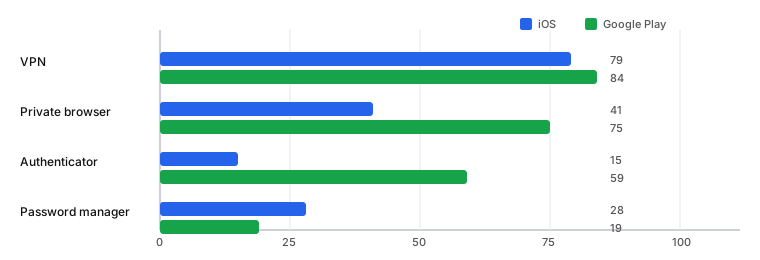
How to read these: search score ≈ relative demand; “max est. daily impressions” is a directional scale indicator. Use them to prioritise where to spend creative attention.
Chart 1 - Max estimated daily impressions (US)
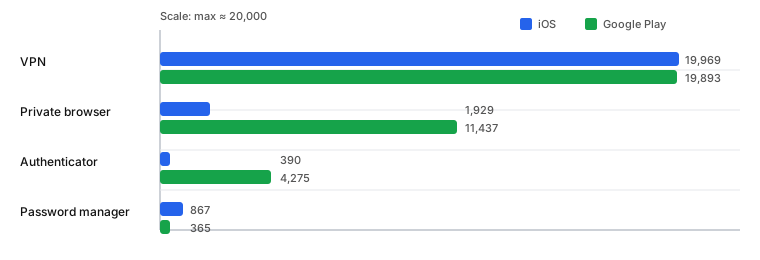
Chart 2 - Search score (US)
What this changes for creative (the “creative analysis” angle)
Demand signals answer where people are looking. Creative answers why they choose you once they see you.
So the useful creative question isn’t “what’s the best screenshot style?” It’s:
What promise is the user trying to verify for this query - and are we confirming it fast?
Below is a practical, query-level way to think about creative for each cluster.
1) VPN: you’re in a commodity comparison auction
When demand is massive and competitors are everywhere, users scan like they’re buying a utility.
Creative job: reduce risk and make the decision feel obvious.
What tends to win (creative ingredients):
- Trust proof fast (ratings, reviews volume, “no logs”, audited, awards)
- Speed/coverage proof (servers/countries, performance claims with context)
- Offer clarity (trial length, pricing model, “cancel anytime”)
- Use-case framing (public Wi‑Fi, streaming, travel, privacy) - pick 1–2, don’t list 10
What to test next (low-effort):
- Screenshot #1: “Fast + private VPN” vs “Secure public Wi‑Fi” vs “Unblock on the go”
- Screenshot #2: “Trusted by X million” / audit proof vs speed proof
- A “how it works in 3 steps” frame late in the set (reduces perceived effort)
2) Private browser: Play Store demand suggests explicit incognito/adblock intent
On Google Play, “private browser” has the signature of a very explicit, outcome-driven query.
Creative job: make the benefit skimmable and believable.
What tends to win:
- Outcome-led promise: “Block ads + trackers” / “Browse privately” (clear, not abstract)
- Tangible feature proof: tracker blocking, cookie prompts handling, private tabs, VPN pairing (if relevant)
- Speed/clean UI proof: “fewer pop-ups, faster browsing” is easy to feel
What to test next:
- Use a simple 2×2 comparison frame: “Standard browser” vs “Private browser” (ads/tracking)
- Put one metric in the first 3 frames (e.g., “X trackers blocked today”) if you can back it up
3) Authenticator: demand is smaller on iOS, bigger on Play - so clarity beats cleverness
Authenticator users often have one question:
“Will this work for the accounts I need, and will it be painless?”
Creative job: remove setup anxiety.
What tends to win:
- Compatibility reassurance: “Works with Google/Microsoft/…”, “Supports QR import”, “Cloud backup” (if true)
- Setup simplicity: “Scan → done” with UI proof
- Recovery story: “New phone? restore codes” (huge conversion friction reducer)
What to test next:
- Screenshot #1: “Set up in 30 seconds” style promise
- A dedicated recovery/backup frame (even if it’s screenshot #4 or #5)
4) Password manager: lower demand = higher importance of differentiation
In lower-volume, incumbent-heavy clusters, users are often switching (or resisting switching).
Creative job: give them a reason to believe switching is worth it.
What tends to win:
- Switching narrative: “Import from X”, “Move in minutes”, “Works across devices”
- Security posture explained simply (encryption, zero-knowledge) without jargon overload
- Everyday convenience: autofill, passkeys, shared vaults, family/team workflows
What to test next:
- A “switching made easy” frame early (screenshot #2 or #3)
- A “what you get on day 1” frame (reduce time-to-value fear)
The demand snapshot (US) - the raw numbers
If you want the numbers underneath the charts:
1) VPN (highest-intent, highest volume)
- iOS (US): search score 79, max est. daily impressions 19,969
- Google Play (US): search score 84, max est. daily impressions 19,893
Top ranks (examples):
- iOS: NordVPN ranked #6 for “vpn” (US)
- Play: NordVPN ranked #8 for “vpn” (US)
- Play: Proton VPN ranked #2 for “vpn” (US)
2) Private browser (meaningfully high volume on Play)
- iOS (US): search score 41, max est. daily impressions 1,929
- Google Play (US): search score 75, max est. daily impressions 11,437
Top ranks (examples):
- iOS: Brave ranked #7 for “private browser” (US)
- Play: Brave ranked #1 for “private browser” (US)
- Play: Tor Browser ranked #9 for “private browser” (US)
3) Authenticator (2FA)
- iOS (US): search score 15, max est. daily impressions 390
- Google Play (US): search score 59, max est. daily impressions 4,275
Top ranks (examples):
- iOS: Microsoft Authenticator ranked #1 for “authenticator” (US)
- Play: Microsoft Authenticator ranked #1 for “authenticator” (US)
- Play: Google Authenticator ranked #2 for “authenticator” (US)
4) Password manager (lower absolute demand, stable incumbents)
- iOS (US): search score 28, max est. daily impressions 867
- Google Play (US): search score 19, max est. daily impressions 365
Top ranks (examples):
- iOS: Bitwarden ranked #3 for “password manager” (US)
- iOS: 1Password ranked #4 for “password manager” (US)
- Play: Bitwarden ranked #4 for “password manager” (US)
- Play: 1Password ranked #8 for “password manager” (US)
Internal links
If you’re building or fixing a privacy-intent listing, start here:
Sources
- APPlyzer keyword search score + impressions + rank snapshots (US, iOS + Google Play)
- App Store / Google Play product pages for referenced apps (linked below)
Referenced apps (store pages)
iOS:
- NordVPN (US): https://apps.apple.com/us/app/nordvpn-vpn-fast-secure/id905953485
- Brave (US): https://apps.apple.com/us/app/brave-browser-search-engine/id1052879175
- DuckDuckGo (US): https://apps.apple.com/us/app/duckduckgo-duck-ai-optional/id663592361
- Microsoft Authenticator (US): https://apps.apple.com/us/app/microsoft-authenticator/id983156458
- Google Authenticator (US): https://apps.apple.com/us/app/google-authenticator/id388497605
- Bitwarden (US): https://apps.apple.com/us/app/bitwarden-password-manager/id1137397744
- 1Password (US): https://apps.apple.com/us/app/1password-password-manager/id1511601750
Google Play:
- NordVPN (US): https://play.google.com/store/apps/details?id=com.nordvpn.android&gl=us&hl=en
- Proton VPN (US): https://play.google.com/store/apps/details?id=ch.protonvpn.android&gl=us&hl=en
- Brave (US): https://play.google.com/store/apps/details?id=com.brave.browser&gl=us&hl=en
- DuckDuckGo (US): https://play.google.com/store/apps/details?id=com.duckduckgo.mobile.android&gl=us&hl=en
- Tor Browser (US): https://play.google.com/store/apps/details?id=org.torproject.torbrowser&gl=us&hl=en
- Microsoft Authenticator (US): https://play.google.com/store/apps/details?id=com.azure.authenticator&gl=us&hl=en
- Google Authenticator (US): https://play.google.com/store/apps/details?id=com.google.android.apps.authenticator2&gl=us&hl=en
- Bitwarden (US): https://play.google.com/store/apps/details?id=com.x8bit.bitwarden&gl=us&hl=en-us
- 1Password (US): https://play.google.com/store/apps/details?id=com.onepassword.android&gl=us&hl=en
Article authority
Editor: App Store Marketing Editorial Team
Method: Practitioner analysis informed by APPlyzer data (keyword demand + rankings) and public store listings.
Want help with ASO?
If you want this implemented for your app, check out our services - or run your workflow in APPlyzer.